Fleet tracking without hardware: your vessels live on the map
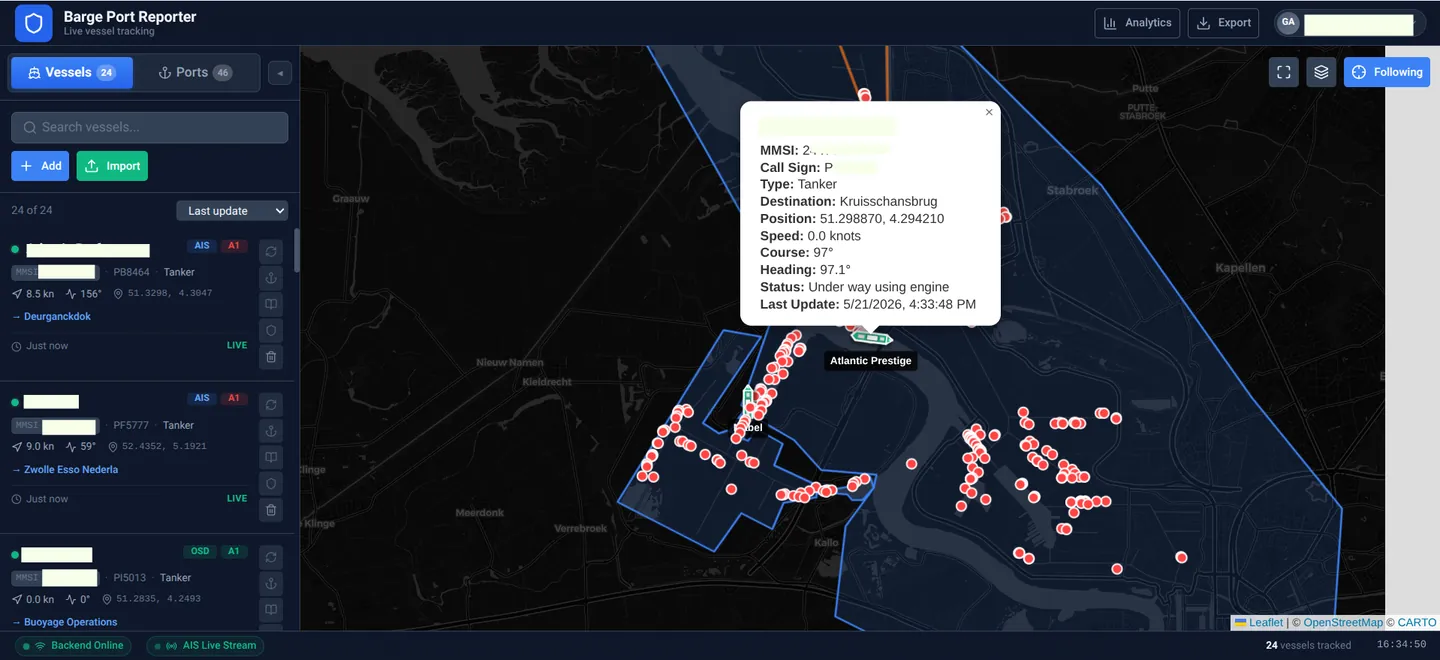
Every inland vessel already transmits AIS. BargeFlow Port Reporter uses those signals to show you where your vessels are, how fast they are going and where they are heading.
There is nothing to install on board, and the crew does not have to open an app. Enter the MMSI number and your vessel is on the map.
How does AIS fleet tracking work?
AIS (Automatic Identification System) is how vessels broadcast their position, speed, course and status. Shore receivers pick up those messages and share them through AIS networks.
BargeFlow Port Reporter collects those messages and lines them up per vessel for you. Because the data already exists, there is no extra box, SIM card or installation.
What you see
Position, speed and course
Per vessel on a nautical chart, with the navigational status: under way, moored or at anchor.
Replay where a vessel has been
Replay the route sailed over a period. Handy when someone asks where the vessel was that Tuesday.
Vessel groups
Put your vessels in groups, for example per client or sailing area, and filter the map and lists to one group.
On your phone, tablet and computer
It runs in the browser. On board, at the office or at home.
Why no hardware?
- Nobody has to come by to install anything.
- You can also follow vessels you charter but do not own.
- You are not tied to a box or a separate subscription for it.
- You add a new vessel yourself, in a few minutes.
What to keep in mind
AIS is only as good as the reception. In areas with few shore receivers a position may come in later, and if a vessel has its AIS switched off, you see nothing.
That is why you see how complete the AIS coverage was per vessel. If data is missing, you see a gap. Nothing is made up.
Push barges without their own propulsion are not required to carry AIS (BPR 4.07). So you do not see them individually on the map; the pushing vessel you do.
How to start
- Create an account; you enter your payment details when you sign up. Then you can try everything for free for 60 days.
- Enter the MMSI number of your vessel.
- As soon as an AIS message comes in, your vessel is on the map. Port visits and sailing times are kept from then on.